
Every Fabric pricing article eventually arrives at the same advice: buy an F64 and your report viewers become free.
That advice is useless to most of the organizations I work with. An F64 on a one year reservation runs roughly US$5,000 a month at list price. For a company with 60, 120, or 200 staff, that is not a licensing strategy. It is a rounding error that ate the budget.
So this post skips F64 entirely. If you run a small Fabric capacity, or you are weighing one against a pile of Power BI Pro seats, here is where the money actually is.
The problem in one paragraph
Since April 2025, Power BI Pro costs US$14 per user per month, up from US$10. On any Fabric capacity smaller than F64, every person who opens a Power BI report in the service still needs Pro. That includes the operations manager who checks one dashboard on Monday mornings, and the regional lead who exports a table once a month. In most small organizations, viewers outnumber creators eight or ten to one, and they are the bulk of the bill.
1. Serve viewers through a Fabric App instead of a Power BI report
This is the biggest change in Fabric this year, and most teams have not noticed it yet.
Fabric Apps (preview since June 2026) let you build and host a web application directly in a Fabric workspace. Microsoft handles hosting and Entra sign in. The app reads from your warehouse, lakehouse SQL endpoint, SQL database in Fabric, or semantic model through built in connectors, and it runs on the capacity you already pay for. It draws capacity units like any other workload. There is no per app or per seat charge for the hosting.
Here is why that matters for licensing. A Fabric App is not a Power BI item. Microsoft’s licensing rules let users with a free Fabric license use non Power BI items on any F capacity, F2 included. The F64 threshold applies to Power BI content specifically.
The practical pattern:
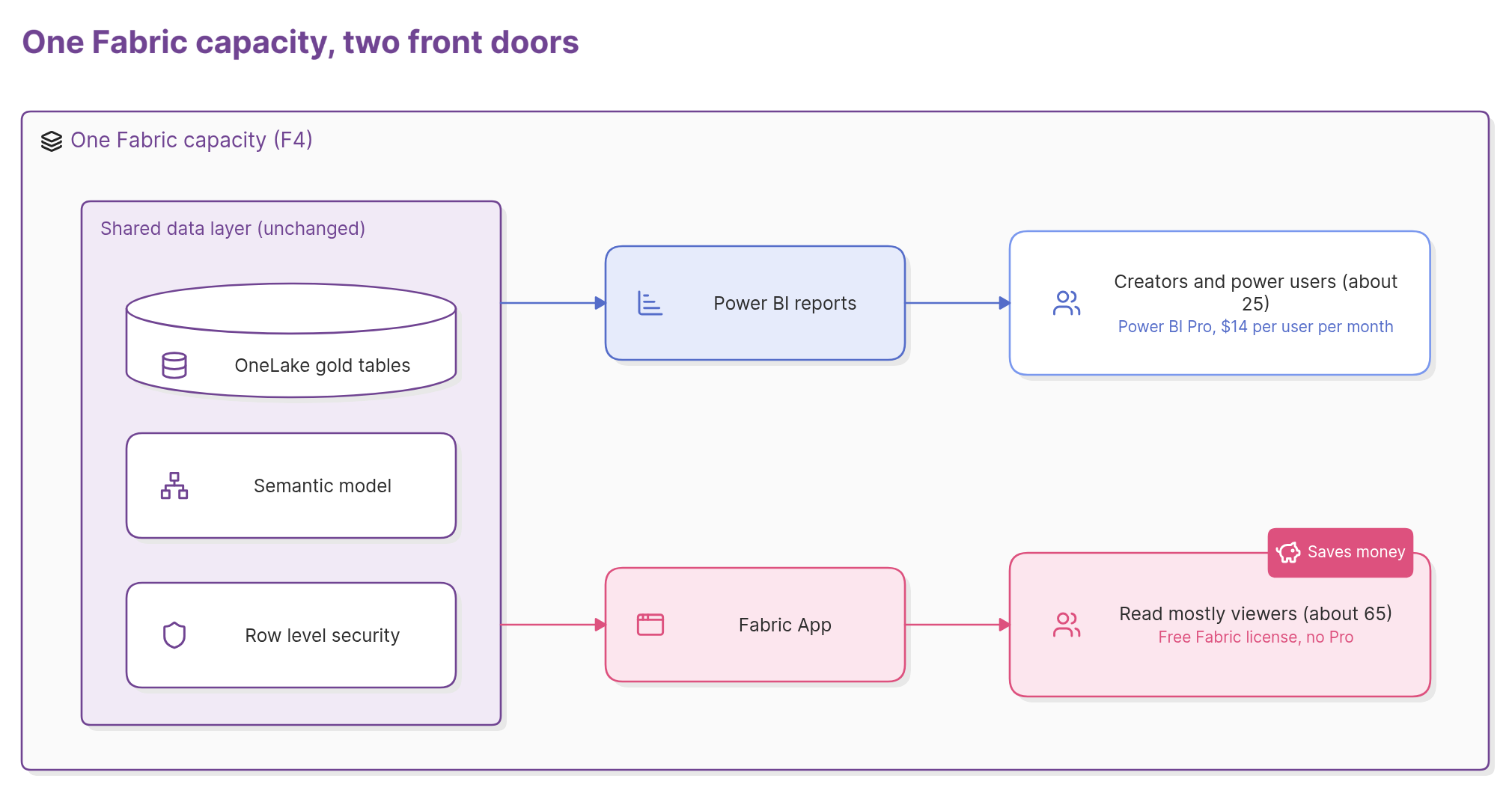
- Creators and power users keep Pro. Anyone who builds reports, slices data freely, or lives in Power BI all day still needs it.
- Read mostly consumers move to an app. The people who check the same handful of numbers get a purpose built app with exactly those views, their own rows only, and no Power BI license.
- The data layer stays the same. Same gold tables, same semantic model, same security. You are changing the front door, not the house.
Two honest caveats. Fabric Apps is in preview, and it is code first (TypeScript), so someone has to build and maintain the app. And an app is not Power BI: users do not get free form exploration, Analyze in Excel, or subscriptions unless you build those in. This is for the majority of your audience who only ever look at the same five numbers, not for your analysts.
One more thing worth watching: at FabCon Europe in September, Microsoft announced an app building experience inside Power BI Desktop, with Fabric Apps and Fabric Database included for Pro and PPU customers up to 1 GB per app. That preview has not opened yet. When it does, the build effort drops considerably.
What it looks like in numbers. Take a hypothetical 90 person organization with 10 report creators, 15 power users, and 65 people who only check dashboards. All on Pro today:
- All Pro: 90 × $14 = $1,260 a month, about $15,100 a year.
- F4 reserved (roughly $313 a month at US list) plus Pro for 25 people: $313 + $350 = $663 a month, about $8,000 a year.
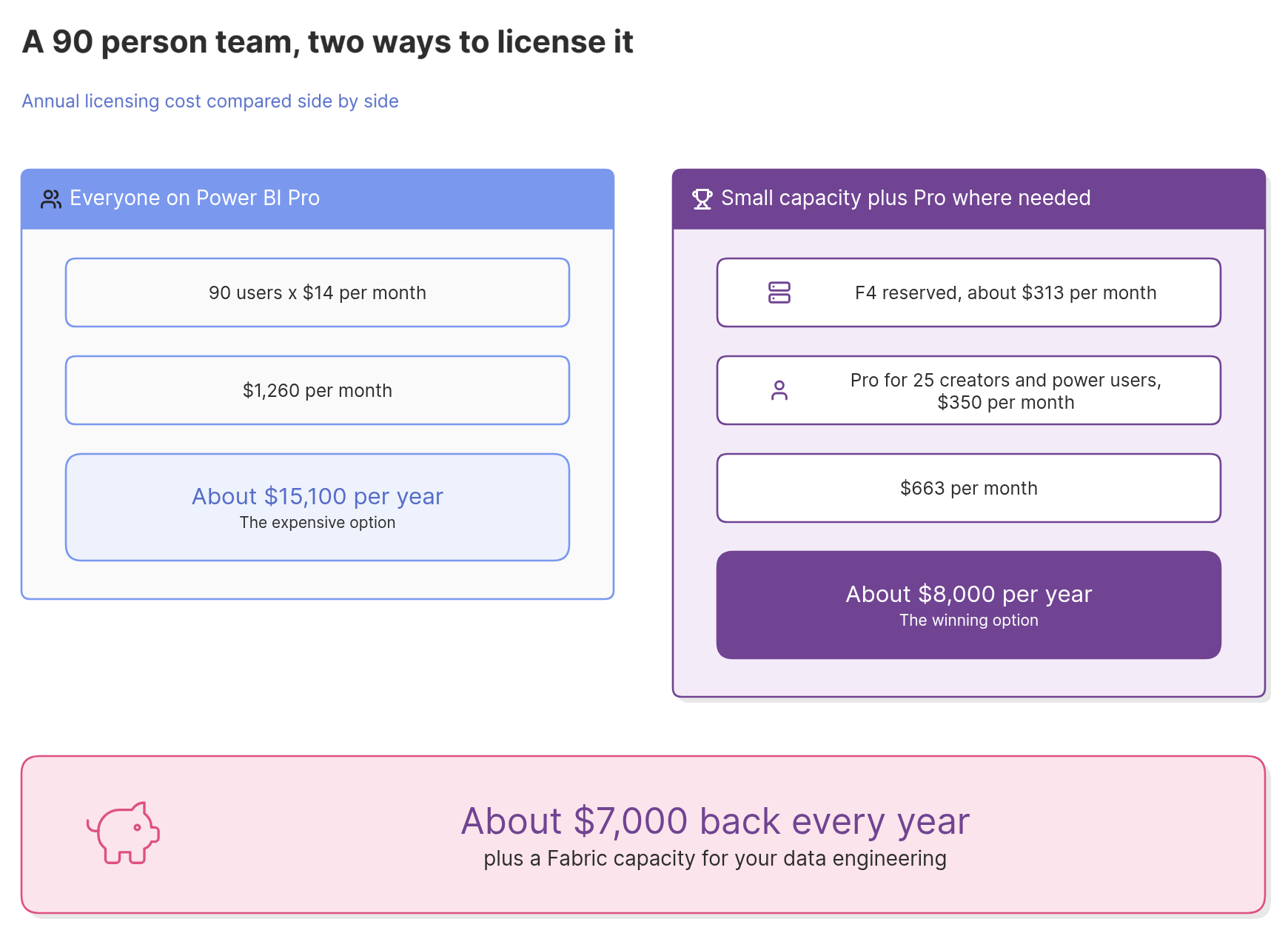
That is roughly $7,000 a year back, and they now have a Fabric capacity for their data engineering too. The build of the app is a one time cost. The licensing saving repeats every year.
2. Check whether capacity overage is quietly on
Fabric now has a feature called capacity overage. When your capacity would otherwise throttle, it keeps running and bills the excess to your Azure subscription at three times the pay as you go rate.
It is enabled by default on new capacities.
That is a reasonable safety net if you have set a sensible threshold. It is an expensive surprise if nobody knows it exists. Open your capacity settings, confirm whether it is on, and set a 24 hour threshold you are comfortable with. Microsoft’s own guidance is to keep it under one third of your daily CU hours, because beyond that you are paying more than a bigger SKU would cost.
3. Reserve the baseline, pay as you go for the rest
A one year reservation is about 40% cheaper than pay as you go, but it cannot be paused. Pay as you go can be paused, and a capacity that only runs during business hours costs roughly half of one that runs around the clock.
For a small estate, the usual right answer is:
- Production capacity, reserved. It serves the app and the reports all day, every day.
- Development capacity, pay as you go, on a schedule. It runs while your engineer works and switches off at night and on weekends.
One detail that catches people: when you pause a pay as you go capacity, any smoothed usage still outstanding is billed at that moment. Pausing is not a way to make a heavy overnight job free. It is a way to stop paying for hours when nothing runs.
4. Move bursty Spark work off the capacity
If you run notebooks, Fabric now offers on demand billing for Spark. When you turn it on, Spark jobs run on separate serverless compute, billed only while they run, instead of consuming your capacity.
Why that saves money: many small teams size their capacity for the one heavy notebook that runs at 2am, then pay for that size all day. Move the notebook to on demand billing and the capacity only needs to be big enough for everything else. Microsoft’s documentation suggests exactly this: enable it, then resize the capacity down.
5. Use mirroring instead of building pipelines
If your source is Azure SQL, SQL Server, Snowflake, BigQuery, Cosmos DB, or one of the other supported databases, mirroring replicates it into OneLake continuously.
The compute that does the replication is free and does not touch your capacity. Storage for mirrored data is free up to one terabyte per capacity unit, so an F2 includes 2 TB and an F4 includes 4 TB. For a small organization, that usually covers everything.
Compare that with a third party ingestion tool billed per row or per connector, or a set of pipelines you have to build, schedule, and fix. Mirroring is often the single cheapest line in a Fabric estate.
6. Find the five items eating your capacity
The Capacity Metrics app shows which items consume the most CU. In most small estates, a handful of items account for most of it: a semantic model refreshing every 30 minutes when the source changes daily, a dataflow reloading full history every night, a report with a visual that scans the whole fact table.
Fix those five and you can often drop a SKU size. Going from F8 to F4 halves the capacity line on your bill.
7. Stop paying for things Fabric already does
Small organizations accumulate tools. An Azure Data Factory here, an Azure SQL database for staging there, a scheduling tool, an ingestion service. Once you have a Fabric capacity, most of that work can live inside it, on compute you have already bought.
The licensing saving is visible. This one usually is not, because it is scattered across three different invoices. Add them up.
And the basics
Before any of the above, do the cheap thing: export your Pro assignments and the last 90 days of activity, and remove licenses from people who have not opened Power BI. Check who holds Microsoft 365 E5, which already includes Pro. Neither takes more than an hour.
Where to start
If you only do one thing this quarter, do the overage check. It takes five minutes, and it is the item on this list most likely to be costing you money right now without anyone knowing.
If you want to do the bigger ones, the Fabric App in particular, that is what our Can Fabric Help Me assessment is for. Three working sessions, a written report built on your tenant’s real usage and capacity data, and a clear recommendation on what to buy, what to cut, and whether an app makes sense for your viewers. If the honest answer is “stay on Pro,” that is what the report says.
I run every session myself, so we take on three a month. Book a slot here.